

CarHome Ultra Unlocker
TheSpinningHead
I noticed the appeal of CarHome Ultra Unlocker almost immediately: it turns an Android phone into a more deliberate driving companion instead of leaving me to hunt through a normal launcher while the car is moving. The idea is simple, but the useful part is how clearly it separates driving tasks from everything else on the phone. Music, phone management, and the controls I need most are placed in a car-oriented environment, which feels much more sensible than trying to operate a standard home screen from the driver’s seat.
This is an Auto & Vehicles app from TheSpinningHead, and it has been around long enough to feel like a product built around a specific problem rather than a passing dashboard trend. It costs $19.99, carries an Everyone age rating, and the current version is 1.7. Those details matter because this is not a free experiment that I can casually forget about; it is a purchase that needs to keep earning its place in my daily routine.
My overall impression is positive, but conditional. The app is most convincing for someone who regularly uses an Android phone in an older car, wants a dedicated driving interface, and values quick access over visual novelty. It is less compelling if the vehicle already has an excellent built-in infotainment system or if I only drive occasionally. The real question is not whether the dashboard looks useful during the first drive. It does. The more important question is whether it remains useful after the novelty disappears.
What the first week feels like
During the first few days, the strongest benefit is mental simplicity. A regular phone launcher is designed for many situations: messaging, shopping, social apps, web browsing, and countless small tasks. A car interface needs a narrower purpose. When I open CarHome Ultra, I am thinking about navigation, music, calls, and managing the phone while keeping my attention on the road. That narrower focus is the app’s central strength.
The store summary describes it as a car dock app, and that is a helpful way to understand its role. It is not trying to replace every part of Android. Instead, it acts as a driving-focused front door. The difference sounds small, but it changes the order in which I interact with the phone. I am less likely to scroll through unrelated icons and more likely to start with the task I actually need.
Related News

Why WhatsApp Messenger Still Makes Everyday Communication Feel Easy

Jurassic World: The Game Is the Better Dino Tycoon for Strategic Players

Threads in Real Life: Who Should Join, Lurk, or Leave

How SHEIN Turned Shopping Into an Endless Content Feed

How to Make Fortnite Feel Smarter on Mobile

Should You Switch to Microsoft Outlook on Mobile?
The first-week appeal is especially clear when the phone is mounted in a fixed position. A dashboard-style interface makes more sense when the screen is already visible and the device is being used as part of the vehicle setup. In that situation, the app becomes a repeatable starting point rather than another application I have to search for. The more consistent the mounting position and driving routine, the more natural the experience becomes.
Music is another area where the design earns its keep. I do not want to navigate a crowded app drawer just to change what is playing. A car-focused layout makes that action feel like part of the same driving workflow. The advantage is not necessarily that it gives me more music choices than Android already offers; the advantage is that it puts the relevant controls in a context where they are easier to reach.
Phone management also benefits from the same approach. Calls and other basic phone actions are easier to treat as driving functions when they sit alongside music and navigation instead of being mixed with every other app. This does not make distracted driving safe, and I would never treat a larger button as permission to use the phone freely behind the wheel. It simply reduces unnecessary searching when I need to prepare something before moving or make a brief, sensible adjustment while stopped.
Gallery
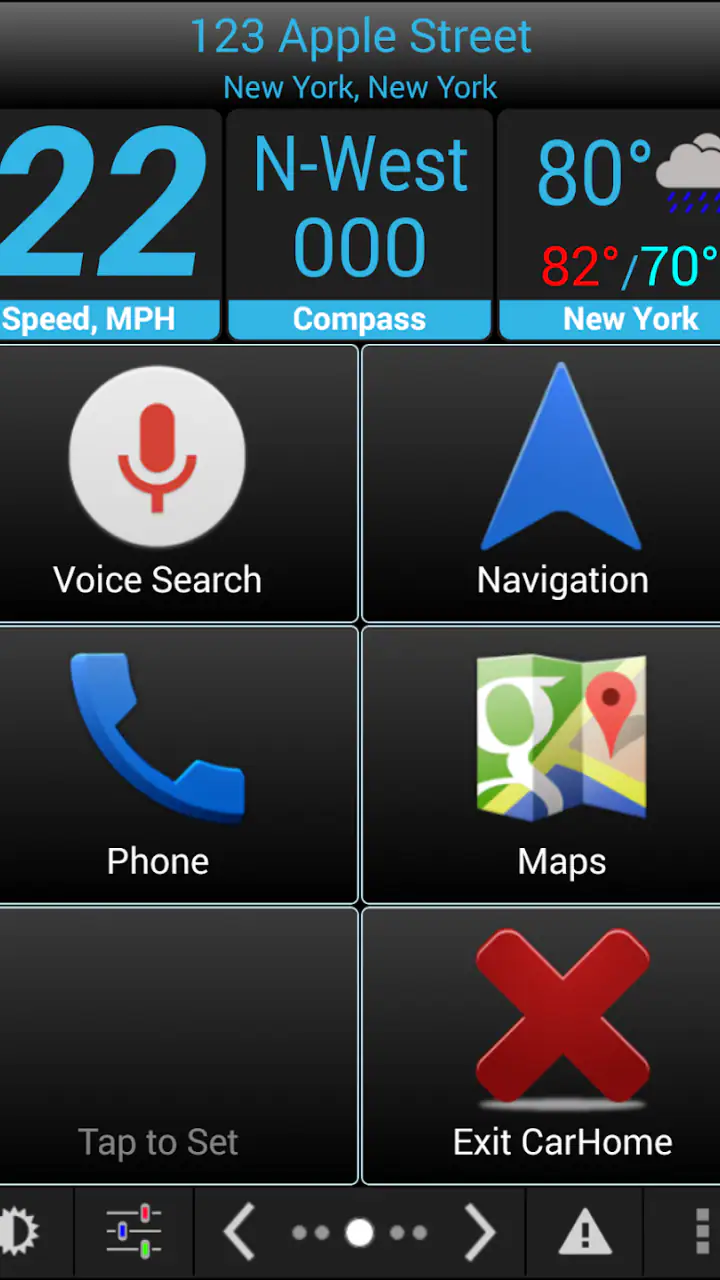
One practical tip is to judge the app from the driver’s normal routine, not from a quick glance at its interface. I would install it, place the phone where it will actually be used, and test the sequence I repeat most often: start the car, open the dashboard, begin audio, and access the phone function I use regularly. If those steps feel calmer and more predictable, the app is doing something valuable. If I still keep returning to the standard launcher, the dedicated interface may not justify the purchase.
The app’s age is also visible in the way I think about it. It was released on March 25, 2011, and the minimum operating system is Android 1.6. That broad compatibility is remarkable from a historical perspective, but it also tells me that this is a mature, focused utility rather than a modern showcase for the newest Android design conventions. I would approach it for its driving workflow, not for contemporary visual polish.
Who benefits most from the dedicated dashboard
I see the best fit in drivers with older vehicles, simple phone mounts, or a preference for controlling the phone directly rather than relying on a newer in-car platform. It can also suit someone who wants a consistent dashboard on different cars, because the phone remains the center of the setup. For a driver who changes between vehicles or uses a basic stereo, that consistency may be more useful than a vehicle-specific system.
It is also a reasonable choice for people who dislike the clutter of a general-purpose launcher. The value comes from removing decisions. When I am already familiar with where the driving controls live, I spend less time remembering which icon belongs to which service. That is a modest benefit on a short trip, but it becomes more meaningful when repeated every day.
On the other hand, I would skip it if my car already provides a comfortable, reliable interface for music, calls, and navigation. A built-in system or a newer phone-integration solution may offer a smoother connection between the vehicle and the phone, along with better support for current services. CarHome Ultra is not automatically an upgrade simply because it is specialized. Its advantage depends on whether the existing setup is actually inconvenient.
I would also hesitate if I rarely drive or usually keep the phone out of sight. A dedicated car home screen has little recurring value when it is opened only a few times a month. The purchase makes more sense when the app becomes part of a repeated habit, not when it is treated as an occasional novelty.
Why the value changes after the first month
After the initial excitement fades, the app has to prove itself through repetition. In my experience, its lasting value comes from reducing friction at the beginning and end of every drive. A useful car dashboard should make the routine feel automatic: phone in place, driving view ready, audio available, and essential phone controls close at hand. If that sequence remains dependable, the app can justify its place on the device long after the first week.
The important distinction is between novelty and habit. Novelty comes from seeing a dedicated car interface for the first time. Habit comes from no longer having to think about where to find the same driving functions. CarHome Ultra has a chance at lasting value because its purpose is narrow enough to become habitual. I do not need to explore it every day; I need it to make the same few actions easier.
That narrow purpose is also a limitation. If my driving needs change, the app may not expand with them in the way a broader modern platform can. For example, someone who increasingly depends on voice interaction, advanced vehicle integration, or newer media services may find that a focused dashboard is no longer the best center of the driving experience. The app’s usefulness is strongest when my needs remain close to its original mission.
Its 4.0 average from around 2K ratings suggests a generally favorable reception without implying that every driver will be satisfied. I read that kind of rating as a signal to examine fit carefully. The app has enough users to show that the concept works for many people, but the score is not so high that I would ignore the trade-offs. A car interface is unusually personal: the phone, mount, stereo, Android version, and driving habits all affect whether it feels essential or merely adequate.
The install base is over 50K, which reinforces the impression that this is a specialized utility rather than a mass-market default. That is not a weakness by itself. In fact, focused tools can be better for a specific routine than large platforms trying to satisfy everyone. Still, I would not buy it because many people have installed it. I would buy it because my own vehicle setup has a clear gap that the app can fill.
A useful month-to-month workflow is to keep the dashboard for actions that truly belong in the car. I would avoid treating it as a second general home screen. The more unrelated shortcuts I add or try to manage through it, the more its purpose becomes blurred. Its strength is the driving context, so I get the best long-term result when I keep that context intact.
There is also a subtle trade-off between centralization and flexibility. Having music and phone management in one place is convenient, but it can make me dependent on that one interface for the drive. If the app does not fit a particular service or personal preference as well as a dedicated alternative, I may have to leave the dashboard and return to Android’s ordinary controls. That is not a deal-breaker, but it means I should test my actual music and phone habits rather than assume that a car-oriented layout solves every related task.
The maintenance that determines whether it stays installed
The biggest maintenance burden is behavioral rather than technical. I need to keep the phone mounted consistently, remember to use the car interface, and make sure the functions I depend on still match my daily routine. If I keep launching the regular Android home screen out of habit, the app loses its role. A dashboard only helps when it becomes the first place I go when the car is involved.
There is also a setup burden whenever the phone, vehicle, or preferred media workflow changes. Switching devices can mean rebuilding the habit. Changing cars can alter the best screen position and the distance at which controls feel comfortable. These are not unusual problems for a car dock app, but they matter because the experience is tied closely to physical placement. A layout that feels convenient on one dashboard may feel less comfortable in another.
I would treat the app as something to configure once and then leave alone as much as possible. Constantly redesigning the driving screen defeats the point of a predictable routine. My practical advice is to prioritize the controls used before a trip or during a safe stop, then resist filling the interface with every application I might want. The fewer choices I face, the more likely the dashboard is to remain useful.
The current version is 1.7, and the product’s long history means I would set realistic expectations about maintenance. The low minimum Android requirement makes it accessible across older devices, but compatibility with an old operating system is not the same as a guarantee that every modern phone, accessory, or service will feel equally polished. Before paying, I would check the app on the device I intend to use and pay attention to how it behaves in the actual car, not only at home.
Another maintenance issue is deciding when the app should be active. If I use it only as a manually opened dashboard, I need to make opening it part of the driving ritual. If my device setup includes a dock or another automatic action, the experience may feel more seamless, but I would still verify that the transition works reliably before depending on it. I would not build a safety-critical assumption around any phone app; the driver should remain able to stop and adjust the setup safely.
That last point is important. A large, car-friendly interface can reduce visual clutter, but it cannot remove the risks of interacting with a phone while driving. I see the app as a preparation and organization tool first. Start the route, choose the music, and arrange the phone before moving. The app’s value is strongest when it helps me avoid unnecessary interaction, not when it encourages more of it.
Where the experience can become tiring
The first source of fatigue is repetition without enough flexibility. A fixed driving dashboard is comforting when it matches my routine, but it can feel limiting when I want a different workflow. If I have to leave the car interface for tasks that a newer integrated system handles naturally, the benefit of having a dedicated screen becomes less obvious. The app is at its best when simplicity is more important than breadth.
The second source is the gap between an older focused utility and current expectations. Many drivers now expect seamless vehicle integration, voice-first control, and media systems designed around modern phones. CarHome Ultra’s appeal is its directness, but directness can feel old-fashioned beside a system that connects the phone and car more deeply. I would choose the app for its dashboard approach, not because I expect it to reproduce every feature of a newer automotive platform.
There is also a possible fatigue from managing two interfaces. If the car has its own controls, the phone has its standard Android launcher, and this app adds a third layer, I may spend time deciding which screen should handle each action. A dedicated dashboard is helpful when it becomes the clear center of the setup. It is less helpful when it creates another place to look.
Price makes that decision more serious. At $19.99, I would expect the app to solve a recurring annoyance rather than merely look appropriate in a car. Someone who drives daily and dislikes the standard phone interface may recover that value through convenience. Someone who already has a satisfactory dashboard may find the purchase difficult to defend, especially when free or built-in alternatives cover the basics.
The age rating of Everyone makes the app broadly approachable, but that does not mean every driver is the right audience. A young user, an occasional driver, or someone with no practical way to mount the phone may gain little from it. The relevant question is not whether the app is easy to understand; it is whether the person has a stable, safe, and repeated use case for a phone-based car dashboard.
Compared with a normal Android home screen, this app wins on focus and driving context. Compared with a modern vehicle-integration system, it may win on independence from a particular car while losing on deeper integration and newer interaction styles. Compared with a simple music app, it offers a broader driving starting point rather than concentrating on playback alone. Those comparisons make its position clear: it is a dedicated middle ground for people who want more structure than a standard launcher but do not need a full automotive ecosystem.
My long-term verdict on keeping it installed
I would keep CarHome Ultra installed when the phone is genuinely part of my car routine. Its lasting value is not in showing off a special dashboard; it is in making repeated actions feel organized and familiar. For an older vehicle, a basic mount, or a driver who wants a consistent phone-centered setup, that can be enough to justify the purchase. The app has a clear identity, and it stays focused on the practical problem it was built to address.
I would not recommend it automatically to someone with a newer car and a strong built-in system. In that situation, the app may add another layer without solving a real inconvenience. I would also steer occasional drivers toward trying their existing launcher or vehicle controls first. A specialized interface earns its place through frequency of use, and infrequent use makes the $19.99 cost harder to overlook.
For me, the deciding test is simple: after the first month, do I reach for the dashboard without thinking, and does it reduce the number of small decisions I make before driving? If yes, the app has lasting value. If I keep bypassing it, the initial novelty has already answered the question. No amount of visual car styling can compensate for a workflow that does not become habitual.
The developer, TheSpinningHead, has produced a mature Auto & Vehicles tool with a very specific purpose. Its history, broad Android compatibility, and focused design make it appealing to a particular kind of driver, while its older foundation and narrower approach make it less attractive beside newer integrated alternatives. I like it most as a dependable front door for a phone-based car setup, not as a universal replacement for every modern infotainment option.
My recommendation is to buy it only when you can name the recurring problem it will solve. If that problem is a cluttered phone screen, awkward access to music, or an inconsistent driving routine, CarHome Ultra can become a useful part of the vehicle rather than another forgotten installation. If there is no such problem, the app is better left out. Its strongest quality is also its most honest limitation: it does one driving-focused job, and its long-term success depends on whether that job matters every time you get behind the wheel.
FAQs for CarHome Ultra Unlocker
What is CarHome Ultra Unlocker and what does it do?
CarHome Ultra Unlocker is the license component associated with the CarHome Ultra driving dashboard app for Android. It is intended to unlock the app’s full functionality after installation, rather than operate as a separate navigation or dashboard application. Once the unlocker is recognized, CarHome Ultra can provide a more complete in-car interface with shortcuts, vehicle information, and driving-focused controls, depending on the Android version and device configuration.
Is CarHome Ultra Unlocker a standalone application?
No. CarHome Ultra Unlocker is generally not useful as a standalone app. It works together with the main CarHome Ultra application, which must normally be installed on the same Android device. After installing both components, the main app checks for the unlocker and enables its licensed features. If the unlocker is installed without CarHome Ultra, you may not see an interface or any immediately usable functions.
Does CarHome Ultra Unlocker work on every Android phone and vehicle?
Compatibility depends on several factors, including your Android version, screen size, manufacturer software, and the way your phone connects to the vehicle. The unlocker is designed for Android devices running the compatible CarHome Ultra app, but older applications may not behave perfectly on newer Android releases. It does not automatically add Android Auto support or guarantee compatibility with every car stereo, dashboard display, Bluetooth system, or vehicle model.
What permissions or features should I consider before installing it?
Because the unlocker works with a driving dashboard application, the main CarHome Ultra app may request permissions related to location, Bluetooth, phone status, contacts, storage, or other connected-device functions. The exact requests can vary by Android version and the features you choose to use. Review each permission carefully, enable only what is necessary, and avoid interacting with the phone while driving. Always configure the app while parked.
Is CarHome Ultra Unlocker free, and how do I activate it?
The unlocker is typically used as a paid license key or premium activation for CarHome Ultra, although availability and pricing can vary by distribution method. You usually install the main application and the unlocker, then open CarHome Ultra so it can verify the license. If the premium features remain locked, check that both packages came from a trustworthy source, restart the app, and confirm that the versions are compatible.
Pros
- Unlocks all CarHome Ultra features after a single purchase.
- Provides a cleaner
- safer interface for in-car Android use.
- Supports customizable shortcuts for navigation
- music
- and contacts.
- Works well with landscape layouts on many Android head units.
- Removes trial limitations without requiring a recurring subscription.
Cons
- Only useful if you already use the CarHome Ultra main app.
- Compatibility may vary across custom ROMs and aftermarket head units.
- Requires the companion CarHome Ultra app to be installed.
- Activation can be inconvenient when switching to a new device.
- Not available for iPhone or iPad users.


